Submitting your work
All contribution and collaboration is done through GitHub.
Once you have set up your development environment, committed to and pushed your branch, it's time to create a pull request (PR).
Before you submit a PR...
Please be sure you've read through our contributing guides:
Submitting a Pull Request
After you have pushed your changes to GitHub, go to your repository fork and look for a "create pull request" button near the top of the page (or, alternatively, go to branches and create it from there). As you create the PR:
-
Complete the Pull Request template:
- Include a brief (but complete) summary of your changes.
- PRs without a description/summary of the changes will not be reviewed or merged, although exceptions may occasionally be made for small PRs and/or PRs made by frequent contributors/maintainers.
- Do not modify or delete the template.
-
Mark your PR as a draft if it is not ready to be reviewed or merged yet. Your PR should be considered a draft if:
- You still plan to make more changes to the code/documentation.
- Changes have been requested to the PR but you have not completed making (or discussing) the requested changes yet.
- You are waiting on feedback from the community and/or maintainers to complete your changes.
This lets reviewers know that the PR may continue to change so they will not spend valuable time reviewing it until it is ready. We do this because, if a PR is reviewed and then it changes, it must be re-reviewed. Reviewing a single PR multiple times is not a productive use of time and we try as much as possible to avoid doing so.
So now that you've created your PR...you're not quite done! Read on to the next section below so you know what to expect next.
Review Process
Automated Checks
At the bottom of each pull request you will see the "GitHub Actions" continuous integration (CI) checks which will automatically analyze all code changed in your branch. These checks try to spot (and suggest corrections for) common errors; they look like this:
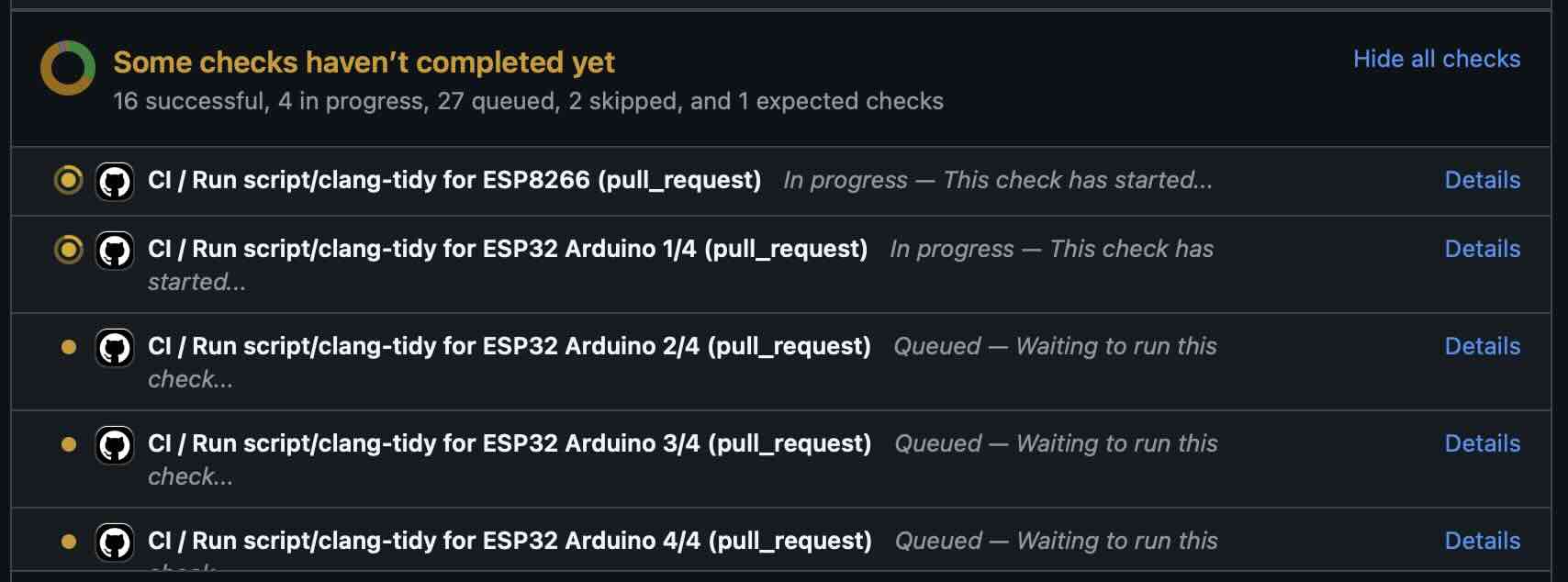
You can click the "Details" link to the right of each check to see the logs for that check. If a red ❌ appears next to any given check, you'll need to view that check's logs and make the suggested changes so that the test will pass.
Implementing Feedback from Automated Checks
Occasionally, an automated check may suggest a change that either isn't directly related to your PR or that may require changes to other components/platforms. When this happens, please create a new/additional PR to implement this change.
For example, the automated checks may suggest moving a constant from your (new) component/platform into const.py.
This is a simple change, but we require that it is done in a separate PR.
Ultimately, all automated checks must be passing before maintainers will review and (eventually) merge your PR!
Review by Maintainers
ESPHome's maintainers work hard to maintain a high standard for its code, so reviews by a human can take some time.
All automated checks must be passing before maintainers will review and (eventually) merge your PR! See the automated checks section above.
When will my PR be reviewed/merged?
ESPHome is a big project; we encourage everybody to test, review and comment on PRs. Despite this, reviews can (and often do) take some time.
But howwww looonnnggg???
Small PRs are easier to review and are often reviewed first. If you want your PR to be reviewed (and merged) quickly, here are some tips:
- Keep PRs as small and as focused as possible. A small, focused PR can usually be reviewed in the short gaps between a maintainer's other work, so those tend to move quickly. Large PRs need a long uninterrupted block of attention to review properly, and most maintainers rarely have those, so a big PR can sit for a while even when nothing is wrong with it. Breaking the same work into several smaller PRs (linked together in the descriptions so reviewers can follow along) almost always gets you merged faster overall.
- Put another way: we would rather review ten ten-line PRs than one 100-line PR.
- Follow all codebase standards. When reviewers have to spend time pointing out
that variables aren't named correctly, or that member access isn't prefixed with
this->, that's time we could have spent reviewing another PR that does follow the standards. - If you're planning something big (refactoring a large section of the codebase, integrating another open source project, or anything you'd describe as "a lot of code"), please talk to us on Discord or open a GitHub discussion before writing it. See How to approach large submissions below.
- If you're unsure how to proceed, please ask. A quick question on Discord is much better than writing something we can't accept and having to redo it. We genuinely want to help you get your change merged.
How to approach large submissions
If you're thinking about contributing a large amount of code, please read this first. "Large" here is not a specific line count; if your change is meaningfully bigger than a typical bugfix or small feature (roughly, more than a few hundred lines, or anything you'd describe as "a lot of work"), this section applies to you. The goal is to help you avoid the worst outcome, which is pouring weeks into something only to have it turned down at review.
- Please talk to us on Discord in
#devsbefore you start writing code. A quick chat lets us tell you whether the idea fits where the project is heading, help you scope the change, and flag if someone is already working on what you have in mind. - Stick around during review. Large PRs almost always need back-and-forth before they can land. If you go quiet after opening one, we have no way to work through revisions with you and it will eventually get closed even if the idea was good.
- Maintainability is a requirement, not a nice-to-have. Anything we merge we have to live with for years. Things
that tend to make a contribution impossible to accept regardless of what it does:
- Large pre-compiled, minified, or bundled assets checked in as source.
- A single huge file containing logic that should live across many files.
- Generated code committed without the generator, or with no documented way to regenerate it.
- AI-assisted output submitted without the author understanding it. If you can't explain and defend every part of the change in review, it isn't ready yet. We're not against AI assistance, we just need the author to actually own the code.
- Plan to break the work into smaller changes that can be reviewed independently, with one platform per PR
(for example,
binary_sensorin one PR,sensorin the next,switchin another, and so on). For example, a sensor that measures seven parameters and supports both I2C and SPI might be split into:- The base "hub" component
- I2C and SPI connectivity
- Each platform (
sensor,binary_sensor, etc.) as its own PR
- It's fine to submit all the PRs at once, but if you do:
- Link them in the PR descriptions so reviewers can follow the work.
- Indicate the order in which they should be reviewed or merged, if relevant.
- Minimize the potential for conflicts as much as reasonably possible.
None of this is meant to be discouraging; we love ambitious contributors, we just want the ambition to actually result in merged code, and a five-minute chat up front is usually the difference.
Can I Help Review PRs?
YES! PLEASE!!!
While only maintainers can merge PRs, we value feedback from the community and it is considered as we review them. Put another way, when a PR has several "This worked for me!" comments on it, we know that the author's work is doing what it's supposed to, even if some other, underlying aspects might still need some fine-tuning to be consistent with the rest of the codebase.
Testing
Often, the easiest way to help review PRs is by testing. Many (but not all) PRs can be used as external components and can easily be added into your configuration for testing, like this:
external_components:
  - source: github://pr#2639
    components: [ rtttl ]
...you just need to update the PR number and component name(s) in the YAML accordingly.
If you test a PR, please share your results by leaving a comment on the PR! If it doesn't work, be sure to include any messages from the compiler and/or device logs so the author can troubleshoot the issue. Comments which state no more than "it doesn't work" are not helpful!
Code Review
Beyond basic functionality ("does it work?"), here are a few other items we check for when reviewing PRs:
- Are file names & paths appropriate for/consistent with the codebase?
- Are namespace names consistent with the component/platform?
- Do all
#definemacro names match the namespace? - Are all codebase standards adhered to?
- Are there any calls to
delay()with a duration longer than 10 milliseconds? - Are any class methods doing work that they shouldn't be? For example, let's consider the
dump_config()method:- This method is intended to do nothing other than print values that were retrieved earlier (in
setup()). - If this method has (for example) a
this->read(...)call in it, it does not pass review and needs to be changed.
- This method is intended to do nothing other than print values that were retrieved earlier (in
-
Is the component/platform doing exactly what it's supposed to? Consider the example of a new serial bus interface a contributor has implemented:
- The author has implemented this component with an action called
superbus.send. - The author has concerns about too much traffic on the bus, so they have implemented a check in this action which
blocks duplicate message transmissions on the bus. The effect is that, if
superbus.sendis called repeatedly with the same message, only the first call will actually send the message on the bus.
This behavior is not consistent with what ESPHome users expect. If the action
superbus.sendis called, it should always send the message, regardless of the content. If there are concerns about (in this example) bus utilization, perhaps messages can be queued instead of dropped/ignored. - The author has implemented this component with an action called
Why was my PR marked as a draft?
If your PR was reviewed and changes were requested, our bot will automatically mark your PR as a draft. This means that the PR is not ready to be merged or further reviewed for the moment.
When a PR is marked as a draft, it tells other reviewers that this particular PR is a work-in-progress and it doesn't require their attention yet.
Once you have made the requested changes, you can mark the PR as ready for review again by clicking the "Ready for review" button:
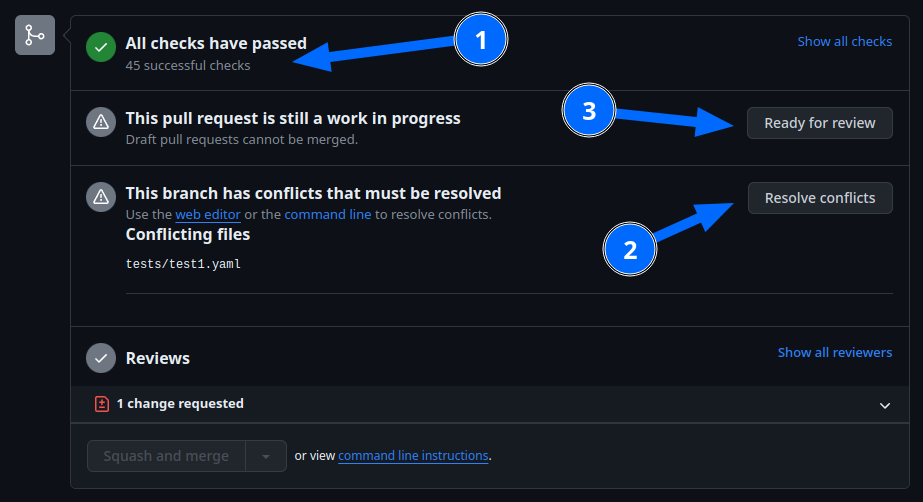
Before you click the "Ready for review" button, ensure that:
- You have addressed all requested changes
- There are no merge conflicts
- All CI jobs and checks are passing successfully
Once you've clicked the "Ready for review" button, the PR will return to a normal state again and our bot will automatically notify the reviewers who requested the changes that the PR is ready to go!
Updating Your Branches
Sometimes you'll want (or need) to bring changes that were made in ESPHome's dev branch back into your (local copy
of a) branch.
The examples that follow in this section assume that you have:
- already used
git remoteto addupstreamas shown earlier, and - your feature branch (the branch from which you created your PR) currently checked out
Feature Branches
There are a couple of ways you can update your (local) feature branch.
-
The easiest is by clicking the "Update branch" button in GitHub:
 ...then run
 git pullto pull these changes back down from GitHub. -
If you prefer to do it the command-line/terminal way, you can run the following two commands:
-
Fetch the latest upstream changes:
git fetch upstream dev -
Merge in the changes we fetched above:
git merge upstream/dev
-
Your Local Copy of dev
As you create new branches for your work, you'll want to be sure they include all of the latest changes from ESPHome's
dev branch -- it's not a good practice to create a new feature branch from an outdated dev branch.
For this reason, you'll periodically want to update your local dev branch. A more detailed explanation can be found
here, but here's the TL;DR:
# Fetch the latest upstream changes
git fetch upstream dev
git rebase upstream/dev
Note that you can use this procedure for other branches, too, such as next or current from esphome-docs.
Do not force-push!
Warning
Using git rebase will result in your changes having to be force-pushed back up to GitHub.
Do not force-push your branch once your PR is being reviewed; GitHub allows reviewers to mark files as "viewed" and, when you force-push, this history is lost, forcing your reviewer to re-review files they may have already reviewed!
If you must update your branch, use a method described in feature branches, instead.